
Sale Deed Certified Copy Karnataka (Kaveri 2.0): What It Proves That Your RTC Can’t
Most buyers check their Bhoomi RTC Online record and stop there. But the RTC only shows who owns the land today. It doesn’t show how they got it, or whether the sale behind it was clean. That proof lives in one place: the registered Sale Deed, and the Certified Copy issued against it.
This guide covers what a Certified Copy is, how to get one from Karnataka’s official Kaveri 2.0 portal, what to do if you don’t have the document number, what it actually costs, and how it’s different from an RTC or an Encumbrance Certificate.
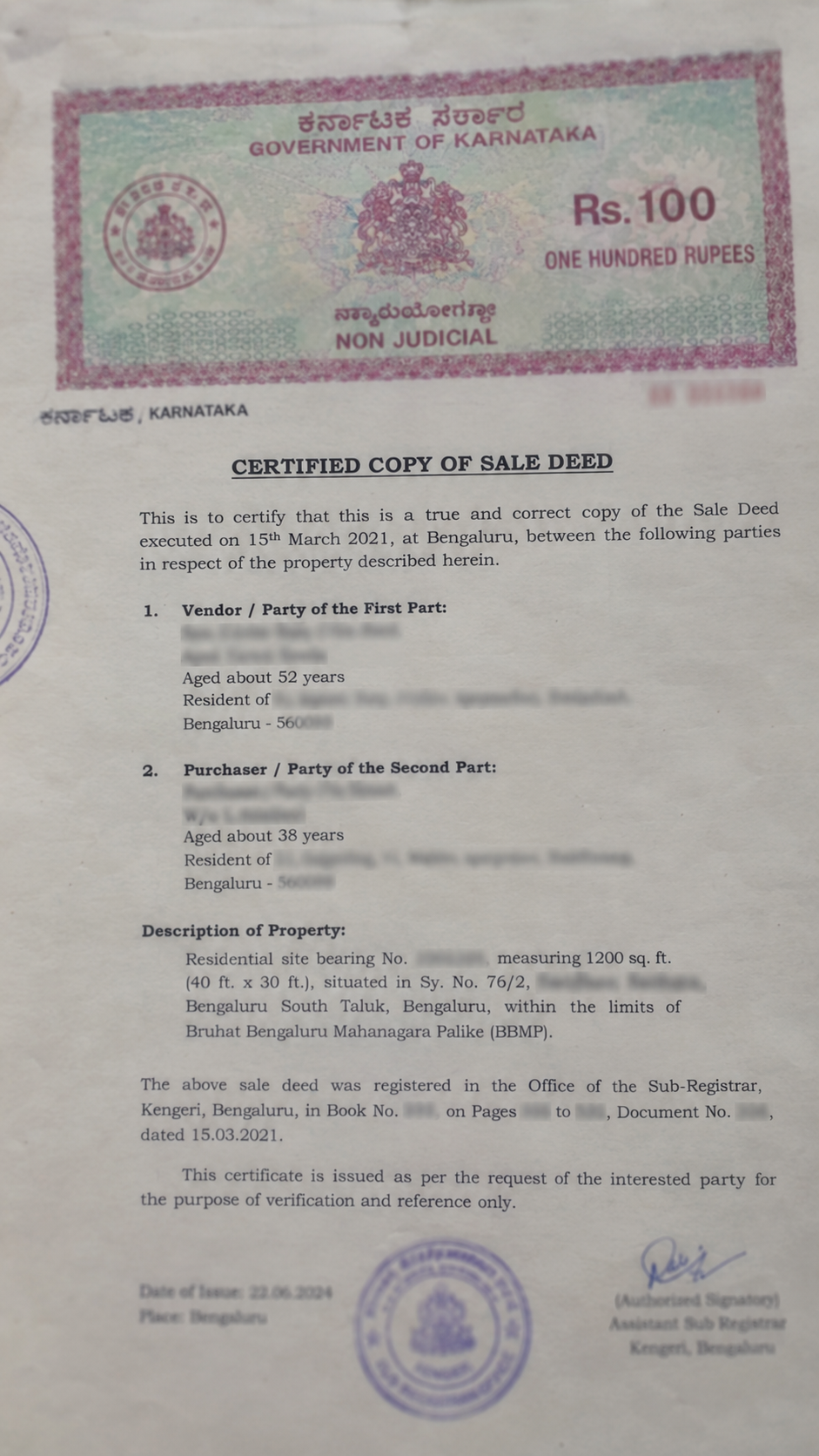
What is a Certified Copy of a Sale Deed, and Why Do You Need It?
Every property sale in Karnataka gets registered at a Sub-Registrar’s Office (SRO). The government keeps the original deed. A Certified Copy is an official reprint of that deed, stamped and signed by the registration office. It carries the same legal weight as the original.
You need one when:
What You Need Before You Search
Have these details ready. Missing even one makes the search much harder:
NOTE
If you don’t have all of these, don’t worry — the section below on lost document numbers covers what to do.
What the Document Number Actually Looks Like
Registration numbers on Kaveri usually follow a set pattern: SRO Code – Book Number – Document Number – Year. For example, a number like HSN-1-12345-2022-23 breaks down as: HSN is the 3-letter Sub-Registrar Office code, 1 is the Book Number (Book 1 covers publicly accessible documents), 12345 is the document’s serial number, and 2022-23 is the registration year. If your document number is given as a single string like this, you can usually paste it directly into the portal’s Quick Search field instead of entering each part separately.
Method 1 — Download via Kaveri 2.0 (Official Government Portal)
Kaveri 2.0 (kaverionline.karnataka.gov.in) is Karnataka’s official portal for property registration records. This is the primary, government-verified way to get a Certified Copy.
Create an Account
Go to the Kaveri 2.0 portal and register using your mobile number. You’ll verify with an OTP.
Go to “Encumbrance Certificate / Certified Copy” Services
Look for the section that lets you search registered documents. It’s usually listed alongside EC search, since both pull from the same registration database.
Enter District, SRO, and Document Details
Fill in the District, SRO, Document Number, Book Number, and Year. Double-check the SRO properties near district or taluk borders are sometimes registered under a neighboring office.
Pay the Applicable Fee
Once the system finds your document, you’ll be asked to pay a fee before the certified copy is released. See the fee section below.
Complete Aadhaar e-Sign
Kaveri 2.0 requires an Aadhaar-based e-Sign before it releases the certified copy — this isn’t optional. An OTP goes to the mobile number linked to your Aadhaar. Enter it to digitally sign and authorize the application. After this, the request typically shows as “Pending at SRO” while the Sub-Registrar’s Office reviews and digitally signs it — this step usually takes a day or two.
Download the Certified Copy
Once the SRO has digitally signed your application, the certified, watermark-free PDF becomes available under “Download Signed CC.” Save it somewhere safe — you may need it again for a loan or a future sale.
Method 2: Third-Party Apps and Websites (Faster, But Not Official)
A few private platforms offer a simpler search experience on top of the same government data. These can be faster for someone unfamiliar with government portals, but they are not the official source — the document they deliver still originates from Kaveri 2.0.
GOOD TO KHOW
If speed and ease matter more than going through the government site yourself, this is a reasonable shortcut. If you want the document with zero third-party involvement, use Method 1 directly.
How to Trace a Lost Document Number
Many people trying to get a Certified Copy don’t have the document number — the original deed is lost, damaged, or was never shared with them in the first place. Here’s how to work around it:
Pre-2004 vs Post-2004 Records — Why the Year Matters
Karnataka began digitizing property registration records in the early 2000s. This creates a real gap that most guides skip:
Post-2004 (usually digitized)
Documents registered from around 2004 onward are usually fully digitized. You can search, pay, and download the e-signed Certified Copy PDF directly online.
Pre-2004 (often not digitized)
Documents registered before that were often not digitized. Kaveri 2.0 may not return a result at all — you’ll likely need to submit a manual application or visit the SRO in person, since the record may only exist on paper in the local office.
If your property’s last registered sale was decades ago, plan for an in-person step. Don’t assume the online portal will have it.
Key Details to Cross-Check on the Certified Copy
Once you have the document, check these fields carefully:
| Field | What to Check |
|---|---|
| Owner & Buyer Names | Match exactly against ID documents — even small spelling differences matter. |
| Survey Number & Boundaries | Should match the current RTC. A mismatch is a warning sign. |
| Sale Consideration | The declared value and payment terms — compare against what was verbally agreed. |
| Stamp Duty Paid | Confirms the deed was properly registered, not just drafted and signed. |
| SRO Stamp / Digital Signature | Confirms this is an authentic certified copy, not an altered document. |
Certified Copy vs EC vs RTC — What’s the Difference?
These three documents get confused constantly. Here’s how they’re different:
| Certified Copy (Sale Deed) | Encumbrance Certificate (EC) | RTC / Pahani | |
|---|---|---|---|
| What it shows | One specific registered transaction | All registered transactions & charges on a survey number, over a period | Current ownership and revenue status |
| Proves | That a specific sale happened legally | Whether the land is free of loans, liens, or unresolved claims | Who is presently recorded as the owner |
| Issued by | Sub-Registrar’s Office | Sub-Registrar’s Office | Revenue Department (Bhoomi) |
| Best used for | Confirming a past sale is genuine | Checking for hidden loans or disputes before buying | Checking current ownership and land details |
For full due diligence before buying land, check all three — not just one.
Check your Bhoomi RTC too
This confirms current ownership and revenue status, alongside the Sale Deed’s proof of the transaction itself.
Government Fees & Processing Timeline
Kaveri 2.0 typically charges a few separate amounts for this service:
REFERENCE POINT
A typical 16-page sale deed has cost around ₹210 in total on the portal — but this depends entirely on how many pages your specific deed runs to. These amounts change periodically, so always check the current fee schedule directly on the Kaveri 2.0 portal before paying.
For digitized records, the certified copy is often available the same day, right after payment. For older, non-digitized records requiring an SRO visit, it can take longer, depending on how quickly the local office can locate the paper record.
Frequently Asked Questions
Disclaimer: This content is provided for informational purposes only and does not constitute legal advice. This platform is independent and not affiliated with, endorsed by, or connected to the Karnataka Department of Stamps and Registration or the official Kaveri Online Services portal. Fees, forms, and processes mentioned above are subject to change — always verify current details on the official government portal.